Lehren aus dem Ausfall des Spotify-Zertifikats





Spotify was hit yesterday with a global outage due to – you guessed it – an expired SSL/TLS certificate. It seems every month (even week) is lather, rinse and repeat.
Outages caused by expired SSL/TLS certificates occur far more often than what shows in the headlines, and they can manifest themselves in all kinds of different ways.
Earlier this year, Microsoft Teams failed to renew a client authentication certificate, leaving millions of users locked as they started work from home. Last week in California, an expired certificate caused underreporting of COVID-19 cases.
In this case, Spotify users were unable to access the popular music streaming service, with thousands of them (about 4,000 conversations) taking to twitter using the hashtag #spotifydown – all due to one expired certificate.
Alles was es braucht ist einer
Most organizations have tens or even hundreds of thousands of these SSL/TLS certificates in their environment. Keeping pace with certificate issuance and renewals at this scale is anything but easy, especially given that most security teams still use manual methods to track them.
All it takes is one unexpected expiration, and you’ve got a costly outage to clean up. However, some messes are harder to clean up than others. That’s because certificates don’t just need to be renewed, they also often need to updated on multiple web servers, app servers and other locations on your network that depend on them.
If a certificate exists in multiple locations, it can be easy to forget where it needs to be installed. This is particularly problematic with wildcard certificates.
Wildcard-Zertifikate: Ein zweischneidiges Schwert
SSL/TLS certificates are typically used to verify trust between public-facing websites and the web browser on your device. In simple terms, if you visit a website with an SSL/TLS certificate, the address will start with “https://” rather than “https://” (the s stands for secure). Each of these certificates has an expiration date, at which point they need to be updated and replaced.
Most companies don’t just have a single website, though, they have multiple domains and sub-domains (e.g. keyfactor.com, info.keyfactor.com, blog.keyfactor.com, etc.). This is why some organizations, or certain groups within them, opt to use wildcard certificates.
Instead of purchasing multiple SSL/TLS certificates from a public certificate authority (CA) for each sub-domain, a single wildcard certificate can be used to secure a website and all of its subdomains. This can be convenient, in that you need to enroll for fewer certificates for your infrastructure.
However, it’s a double-edged sword, because without proper certificate lifecycle management, it can be difficult to know if you’ve replaced the certificate in all locations where it needs to be updated – all at the same time. It also creates security concerns, since a single wildcard certificate could put your entire infrastructure at risk, if compromised.
In most cases, we recommend not using wildcard certificates, simply because of the elevated risk of an outage or breach that could result.
Ein Beispiel - Spotify
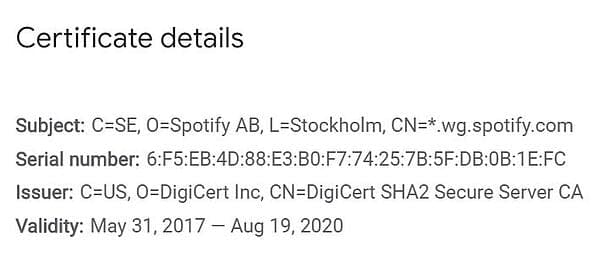
Now back to Spotify. A quick look into Google Certificate Transparency Logs (see the image below) shows that the particular certificate that caused this outage was, in fact, a wildcard certificate. How can you tell? The asterisk beside the domain name (CN=) is what gives it away.
Empfehlungen
To avoid this situation altogether, you should limit your organization’s use of wildcard certificates. That said, there are certain situations where they can be beneficial. Either way, you’ll need to ensure that you have visibility of every certificate in your organization and have processes in place to renew them before they expire.
Here are some key takeaways:
- Limit the use of wildcard certificates in your organization
- Keep an accurate and up-to-date inventory of certificates in your environment, including (at minimum) key length, hash algorithm, expiry, locations, and the certificate owner
- Ensure that private keys are stored and protected according to best practice
- Automatisieren Sie die Zertifikatserneuerung und -bereitstellung, um unerwartete Abläufe zu verhindern.
It’s no secret that certificate lifecycle automation tools like Keyfactor Command are built to address these needs (and more). Rapid growth in the number of keys and certificates in organizations has rendered manual and homegrown methods obsolete. Before you look into tools though, it’s important to map out your requirements.
What’s Your Maturity?
If you’re not sure where to begin, identifying where you stand today is a good start.
Download the Certificate Management Maturity Model to see how your organization stacks up against best practices and get practical recommendations for improving your processes.
Die Quelle abonnieren
Stay secure with Keyfactor's monthly newsletter, packed with expert insights and practical steps for quantum-readiness.
Lesen Sie weiter

Zustand der Maschinen-Identität: Die Auswirkungen von Zero-Trust und Multi-Cloud auf die IAM-Strategie
Mehr lesen
Cybersecurity Awareness Month: Neun Dinge, die Sicherheitsteams über PKI wissen müssen
Mehr lesen