FIM 2010 R2 Upgrade: How To Tell If MSDN Was Installed




With the new features of FIM 2010 R2 such as external SSPR, reporting, and BHold (not to mention all of the other extras – like the the gains in performance, new connectors, etc.), folks are of course interested in updating their FIM 2010 installations.
The problem is that if you installed the MSDN version of FIM 2010 – the upgrade is slightly more involved. With the MSDN version, for instance, you cannot upgrade the FIM Sync Service – you will have to uninstall and then install R2. Also, the handy little backup script to backup the Service and Portal components will not run – and backup items will need to be dealt with manually. (See the Release Notes for FIM 2010 R2 here.
So how do you tell if you’ve installed the MSDN version?
I knew the Microsoft.IdentityManagement.ConfigurationBackup script would fail to run – but that seemed a little awkward, “try to run that script, and if it fails, then you have the MSDN version.”
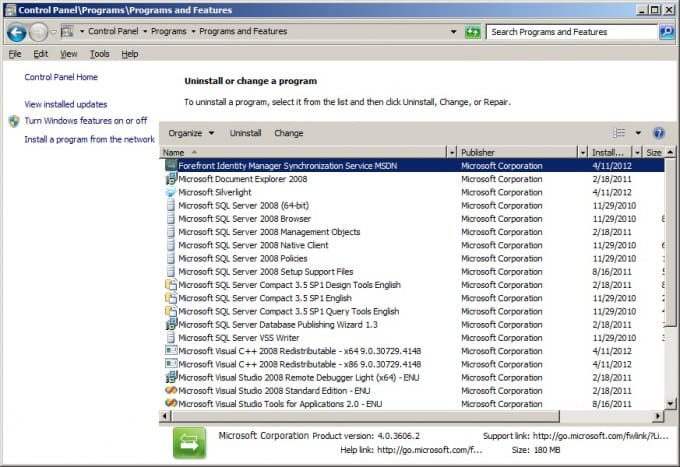
It seems obvious now, but my favorite search engine wasn’t helping, and so it took me more than a few minutes to hit upon the quick and easy way to check. Just open the Control Panel, Programs and Features. It will list it as part of the name of the FIM component (Sync or Service).
The image below clearly shows the Sync software installed as the “MSDN” version.
I hope this helps save some time for someone else. Happy upgrade!
Subscribe to The Source
Stay secure with Keyfactor's monthly newsletter, packed with expert insights and practical steps for quantum-readiness.