

Knowing that a certificate has been revoked is only useful if you can actually verify it. Whether you are troubleshooting a TLS failure, auditing your CA’s revocation infrastructure, or validating certificate status in a CI/CD pipeline, the ability to locate, download, and inspect a Certificate Revocation List (CRL) is a core PKI skill.
This guide walks through every step: finding the CRL Distribution Point (CDP) in a certificate, downloading and reading the CRL with OpenSSL, Windows, and EJBCA, and interpreting the results. If you need a conceptual foundation first, read about what is a CRL.
Why you need to know how to check a CRL
Checking the CRLs is an essential step in a PKI-based transaction because they verify the identity of the site owner and discover whether the associated certificate is trustworthy. If you cannot confirm that a certificate is still in good standing, you cannot trust the connection it secures.
For PKI administrators, this means understanding revocation checking at the operational level, not just the conceptual one. For DevOps engineers integrating certificate validation into automated workflows, it means knowing which commands to run, what output to expect, and how to act on the results.
For a deeper look at how CRLs compare to OCSP and when to use each, read Certificate Revocation List (CRL) vs Online Certificate Status Protocol (OCSP): What You Need to Know. For a complete overview of CRLs, visit our guide on what is a certificate revocation list.
What do you need to check a CRL
To check a CRL, you need two things:
- The URL to the CRL. This is found in the CRL Distribution Points extension of the certificate you are validating. Every X.509 certificate that supports CRL checking includes one or more CDP URLs pointing to where the issuing CA publishes its revocation list.
- A tool to view the CRL. Common options include OpenSSL (Linux/macOS), Windows certutil, your browser’s built-in certificate viewer, or a CA administration interface like EJBCA.
How to find the CRL distribution point in a certificate
Before you can download a CRL, you need to extract the CDP URL from the certificate. Here is how to do it in a browser and on the command line.
Finding the CDP in your browser
Chrome and Edge:
- Navigate to the HTTPS site whose certificate you want to inspect.
- Click the padlock (or tune) icon in the address bar.
- Select Connection is secure, then click Certificate is valid.
- In the certificate viewer, open the Details tab.
- Scroll down to the CRL Distribution Points field. The value contains one or more URLs where the CA publishes its CRL.
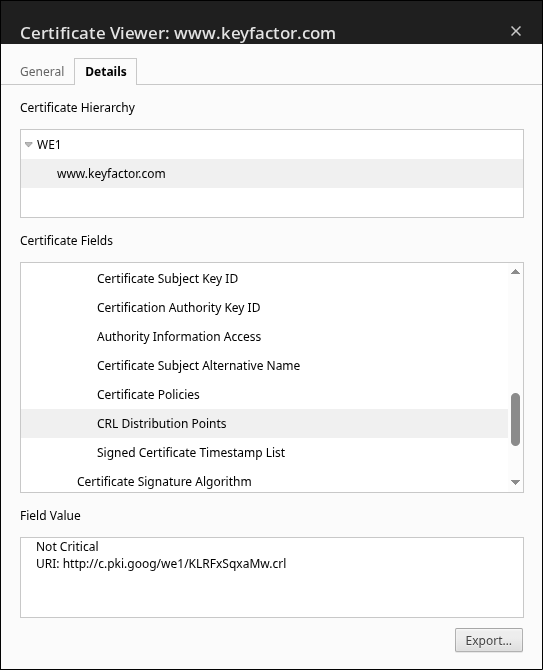
Firefox: 6. Click the padlock icon in the address bar. 7. Select Connection secure, then click More Information. 8. Click View Certificate. 9. In the certificate details, look for the CRL Distribution Points field. Firefox displays the CRL URLs directly in the certificate viewer.

Finding the CDP using OpenSSL
If you have the certificate as a PEM file, extract the CDP with a single command:
openssl x509 -in keyfactor-certificate.pem -noout -text | grep -A 4 "CRL Distribution Points" The output displays the URI(s) where the CA publishes its CRL. For example:X509v3 CRL Distribution Points:
Full Name:
http://c.pki.goog/we1/KLRFxSqxaMw.crl
Copy this URL for the next step.
How to download and view a CRL
Downloading a CRL from the CDP
Once you have the CDP URL, download the CRL file using curl or wget:
curl -o crl.der http://c.pki.goog/we1/KLRFxSqxaMw.crl
However, the simplest way is to paste the URL directly on to your web browser, and it will automatically download the CRL file for you.

CRL files are typically distributed in DER (binary) format. If your tooling requires PEM format, convert the file after downloading:
openssl crl -in crl.der -inform DER -outform PEM -out crl.pem
Viewing CRL contents with OpenSSL
For a DER-encoded CRL:
openssl crl -in crl.der -inform DER -text -noout
For a PEM-encoded CRL:
openssl crl -in crl.pem -text -noout
The output includes several key fields:
- Issuer: the CA that signed and published the CRL
- Last Update: when the CRL was generated
- Next Update: when the next CRL is scheduled to be published
- CRL extensions: optional fields to provide additional information
- Revoked Certificates: a list of entries, each containing a serial number, revocation date, and (optionally) a reason code
Certificate Revocation List (CRL): Version 2 (0x1) Signature Algorithm: ecdsa-with-SHA256 Issuer: C=US, O=Google Trust Services, CN=WE1 Last Update: Jun 18 08:21:38 2026 GMT Next Update: Jun 28 07:21:37 2026 GMT CRL extensions: X509v3 Authority Key Identifier: 90:77:92:35:67:C4:FF:A8:CC:A9:E6:7B:D9:80:79:7B:CC:93:F9:38 X509v3 CRL Number: 5065 X509v3 Issuing Distribution Point: critical Full Name: URI:http://c.pki.goog/we1/KLRFxSqxaMw.crl Only User Certificates Revoked Certificates: Serial Number: 8D91F2A7C4BE3D6217A8E5409B3C7F12 Revocation Date: Jun 16 23:44:08 2026 GMT Serial Number: 1F5AC7D8E239B640A4C17E93D2F8B6A5 Revocation Date: Jun 16 23:44:11 2026 GMT Serial Number: C7B84219F0D56AE3348C9127E5AB6D40 Revocation Date: Jun 17 19:44:02 2026 GMT Serial Number: 2A4E8D6F91C3B750E7F1248AB5D93C61 Revocation Date: Apr 6 07:43:37 2026 GMT Serial Number: B4F7E2A9136CD8507A8B14E2C59D7F03 Revocation Date: May 20 11:23:41 2026 GMT Serial Number: 6E2B93D4A1F7085CC4E97A21D8B35F6A Revocation Date: May 27 08:56:03 2026 GMT Signature Algorithm: ecdsa-with-SHA256 Signature Value: 30:45:02:20:6a:7f:91:c3:e8:24:b1:5d:49:2e:73:8f:0c:57: 9a:de:14:63:28:b9:45:f1:7c:83:0a:dd:61:fe:32:8c:17:02: 21:00:d4:5b:8e:19:72:ac:f0:43:9d:61:b7:2e:c5:8a:34:ef: 7b:18:c2:4d:93:f6:a1:57:68:0f:3c:ba:51:9d:84
Each entry in a CRL includes the identity of the revoked certificate and the revocation date. Optional information includes a time limit, if the revocation applies for a specific time period, and a reason for the revocation. Common reason codes include Key Compromise, Privilege Withdrawn, and Cessation of Operation.
Viewing CRL contents on Windows
Windows provides two options for viewing CRL files.
Using certutil:
certutil -dump crl.crl
This outputs the CRL contents in a structured format, including the issuer, validity dates, and the full revocation list, similar to the openssl output pictured above.
Using the Windows CRL viewer:
Double-click a .crl file to open the built-in Windows CRL viewer. The GUI displays the issuer, effective date, next update date, and a browsable list of revoked certificates.
How to retrieve CRLs from EJBCA
If your organization uses EJBCA as its certificate authority, you can generate and download CRLs directly from the CA interface.
Using the EJBCA admin GUI
- In the EJBCA Admin Web interface, select CA Structure & CRLs from the menu.
- To generate and publish a new CRL immediately, click Create CRL.
- To download an existing CRL, click the Download link next to the relevant CA.
Using the EJBCA command line
Generate a new CRL:
bin/ejbca.sh ca createcrl <CA name>
Retrieve the current CRL:
bin/ejbca.sh ca getcrl
You can also retrieve CRLs through the EJBCA RA Web interface by selecting CA Certificates and CRLs and specifying the crlnumber parameter to download a specific CRL version.
Video demo: how to view and check a certificate revocation list
For a visual walkthrough, the Keyfactor for Developers YouTube channel offers a tutorial covering CRL retrieval from EJBCA, including where to find CRLs, the best methods for retrieval, and how to configure CRL Distribution Points.
Important elements to look for when viewing a CRL
When you open a CRL, focus on these fields:
- Issuer: identifies the CA that signed and published the CRL. Confirm this matches the CA you expect.
- This Update: the date and time the CRL was generated. A stale date here suggests the CA may not be publishing on schedule.
- Next Update: the date and time the next CRL is expected. If the current time is past this value, the CRL is expired and should not be trusted.
Checking whether a specific certificate is revoked:
- Open the certificate you want to validate and note its serial number (found in the certificate details).
- Open the CRL and search for that serial number in the revoked certificates list.
- If the serial number is present: the certificate has been revoked. The entry shows the revocation date, reason code, and (if applicable) an invalidity date for backdated revocation.
- If the serial number is absent: the certificate has not been revoked and is in good standing (according to this CRL).
Troubleshooting CRL check failures
When CRL checks fail, the cause typically falls into one of these categories.
Unreachable CDP. The CDP must be reachable at all times to ensure that devices or applications can retrieve the new CRL when needed. Otherwise, it is not possible to determine the status of the certificate in question, and the certificate revocation status checks will fail. Verify network connectivity, DNS resolution, and firewall rules for the CDP URL.
Expired CRL. Your CRL is expired or unreachable, all of your certificates may become immediately unusable. Monitor CRL expiration proactively and ensure the CA is publishing on schedule.
Large CRL performance. Extremely large CRLs can cause timeouts during download or parsing. In enterprise EJBCA deployments, this may require database tuning, increased timeout thresholds, and dedicated CRL generation nodes to maintain acceptable performance. You may also consider switching to partitioned CRLs to increase performance.
Format mismatch. If a tool expects PEM format but receives DER (or vice versa), parsing will fail. Convert between formats using OpenSSL:
# DER to PEM
openssl crl -in crl.der -inform DER -outform PEM -out crl.pem
# PEM to DER
openssl crl -in crl.pem -inform PEM -outform DER -out crl.der
If your CRL checks are consistently slow, consider supplementing with OCSP for real-time status checks. Learn more in CRL vs OCSP: What You Need to Know.
Got CRL questions? We’ve got answers.
How do I check if a certificate has been revoked?
Extract the certificate’s serial number from its details, then download the CRL from the CDP listed in the certificate. Search the CRL’s revoked certificates list for that serial number. If it appears, the certificate has been revoked.
What tools can I use to view a CRL?
OpenSSL is the most widely used tool for viewing CRLs on Linux and macOS. On Windows, certutil and the built-in CRL viewer (double-click the .crl file) are available. CA platforms like EJBCA also provide CRL viewing and download through their admin interfaces.
What information does a CRL contain?
A CRL includes the issuer (the CA that published it), the generation date, the next expected update date, and a list of revoked certificates. Each revoked entry contains the certificate’s serial number, revocation date, and an optional reason code.
How do I find the CRL distribution point in a certificate?
Open the certificate in a browser’s certificate viewer or use OpenSSL (openssl x509 -in cert.pem -noout -text) and look for the CRL Distribution Points extension. This field contains the URL(s) where the CA publishes its CRL.
What is a delta CRL?
A delta CRL contains only the certificates that have been revoked since the last full CRL was published. Delta CRLs reduce bandwidth and parsing overhead by supplementing the base CRL with incremental updates rather than republishing the entire list.
Why would a CRL check fail?
Common causes include an unreachable CDP (network or firewall issues), an expired CRL (the CA failed to publish on schedule), a format mismatch (DER vs PEM), or the CRL file being too large for the client to download and parse within its timeout window.
How often should I check CRLs?
Clients typically cache the CRL until the “Next Update” timestamp expires, then download a fresh copy. For proactive monitoring, check CRL availability and freshness continuously using automated tools so you can catch expiration or availability issues before they cause outages.
Can I automate CRL monitoring?
Yes. Certificate lifecycle management platforms like Keyfactor Command provide automated CRL and OCSP monitoring, alerting teams before CRLs expire or CDPs become unreachable. You can also script periodic checks using OpenSSL and cron jobs for lightweight monitoring.